| File Menu |
|
|---|---|
|
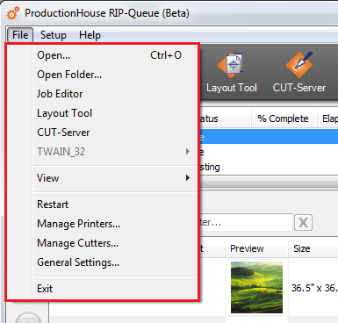
The File Menu gives you quick access to tools that let you manage your application.
You can open the "File Menu" clicking [File ] on the main toolbar. Once the File Menu opens, you can choose from the following options:
 Open Open
This option allows you to open single images. See Opening an Image for more information.
Open Folder
This option allows you to open an entire folder of images in RIP-Queue.
Job Editor
This option sends the currently selected job to Job Editor. See Job Editor for more information about the Job Editor application.
Layout Tool
This opens Layout Tool application. See Layout Tool for more information.
CUT-Server
This opens CUT-Server application. See CUT-Server for more information.
TWAIN_32
This option allows you to scan an image directly into RIP-Queue. TWAIN is an industry standard that is used for retrieving images from scanners and digital cameras.
NOTE: See the User Manual or Help Files for your scanner or digital camera if you have trouble using the TWAIN option.
View
Restart
This option restarts your program.
NOTE: Restarting your program interrupts all processing and printing.
Manage Printers
This opens the Printer Manager dialog. Select a printer that you want to use and configure printer settings that you need.
NOTE: Accessing Manage Printers interrupts all processing and printing.
Manage Cutters
This opens Cutter Manager dialog. Select a cutter that you want to use and configure cutter marks. You can create custom mark variations for the same cutter. Highlight a cutter and click the [Duplicate...] button. This opens the Configure Cut Marks dialog, with “Copy” appended to the cutter name. Enter a new name if desired, and select the settings you want for this variation of the cutter, and click [OK]. The duplicated cutter will be listed in Cutter Manager and will show up in the Contour Cutter Selection list with the new name that was entered.
NOTE: Accessing [Manage Cutters] interrupts all processing and printing.
General Settings
General Settings controls the RIP-Queue options that are not specific to a particular printer or job. See General Settings for more information.
NOTE: Accessing the General Settings interrupts all processing and printing.
Exit
Exit shuts down and closes the program. |
|