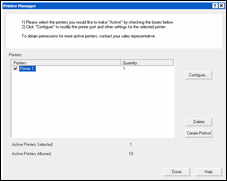
| Printer Manager | |
|---|---|
|
The Printer Manager adds and deletes printers used by Job Editor. When RIP-Queue is installed, the local RIP-Queue printers are automatically added to Job Editor. Use Printer Manager primarily to add remote RIP-Queue printers (printers controlled by a RIP-Queue system which resides on a different computer), or to re-add printers that have been deleted.
To access Printer Manager, choose File > Printer Manager from the Job Editor menu.
 Adding a Printer Adding a Printer
Deleting a Printer
Click Delete from the Printer Manager dialog box to delete a printer. Deleting a printer from Job Editor does not delete the printer from RIP-Queue.
|
Figure 1 |