Each cut job contains at least one layer. Depending on the configuration of the original source image and the RIP-Queue application, a cut job may have multiple layers generated automatically.
If you want a specific Cutter Settings selection to be made automatically for a layer, name the Cutter Setting the same as the Cut Layer. For example, a Cutter Setting named "CutContour1" will automatically be selected for the Cut Layer named "CutContour1".
If there is not a Cutter Settings selection that matches the Cut Layer name, then the [Default Cutter Setting] will be selected for that layer. The Cutter Setting selected for each layer can be changed manually.
The ability to name layers has been improved. In the past, the cut layers had to have the cutter prefix (e. g. CutContour) followed by a number from 1 to 9. In versions ONYX 12, the layers can have more descriptive names added to the prefix: e. g. CutContourKissCut, CutContourThroughCut, CutContourPerforation.
NOTE: Cut Layer and Settings changes are not saved automatically. Select Save icon from the Tool bar to ensure any changes you make to Layers and Settings are saved.
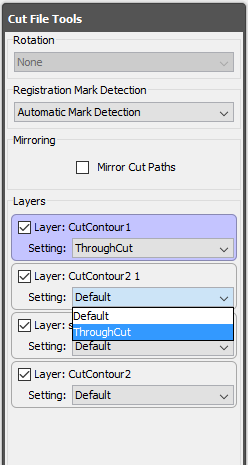
Figure 1