White/Black Limits
|
|||
|---|---|---|---|
|
The White/Black Limits tool lets you clean up your image without introducing contrast. This tool was developed primarily to clean up scanned images. When an image is scanned, the white and black values do not appear as true white and black. Setting [White/Black Limits] fixes this problem and balances the other colors. Because [White/Black Limits] control the lightness of the color value averages instead of controlling the inks, this tool uses RGB
You can open the [White/Black Limits] tool by clicking [Tools] button in the Color Correction Tab and then selecting [White/Black Limits].
|
|
 Color Limits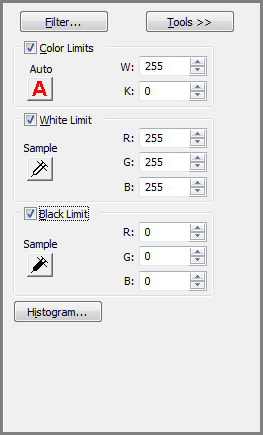
.png)