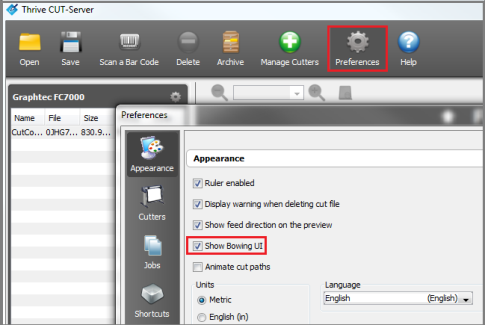
Bowing tools allow you to introduce a "bow" into the cut data, which can be used to compensate for bowing that is sometimes experienced when printing on certain kinds of printers.
NOTE: [Media Bowing Compensation] option is available in ONYX RIP Version X10.1 and newer
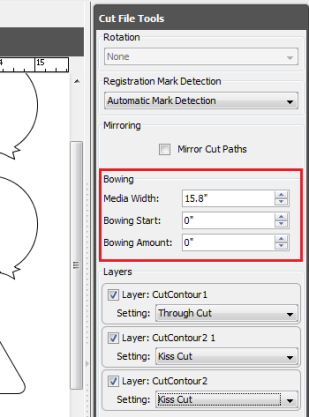
There are 3 options found in the Bowing section: [Media Width], [Bowing Start], and [Bowing Amount] (Figure 2).
Media Width: The bowing behavior observed on the printer is found to be centered across the width of the media. This option allows you to specify the width of the media, and the software will center the bow appropriately.
Bowing Start: Current understanding is that there are some cases where at the beginning of the print, the bowing is not present or as pronounced due to the heaters not yet being hot enough to cause the bowing issue. This option allows you to specify how far down the media to begin the bowing. Everything above this point will be untouched, and everything below this point will have a bow introduced.
Bowing Amount: This option specifies how far down from a straight line the vertex of the bow is found. Essentially, this option specifies how bowed the cut data should be.
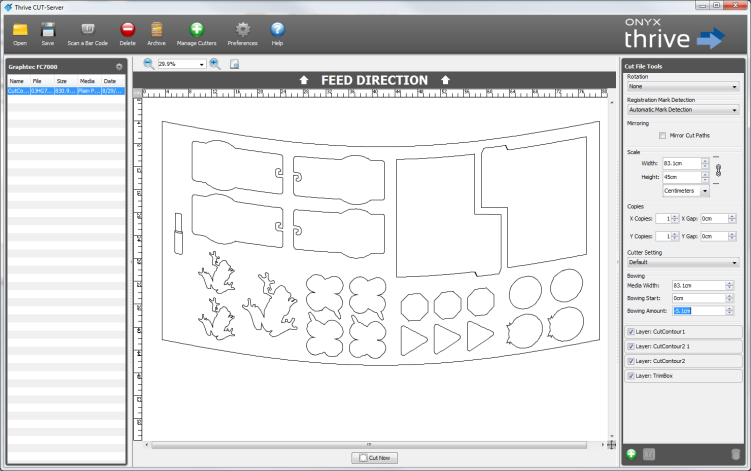
The (Figure 3) shows a cut file setup for bowing adjustments, where the width of the media equals the width of the cut data, and is bowed down 2" (an exaggerated amount for the sake of demonstrating the option).