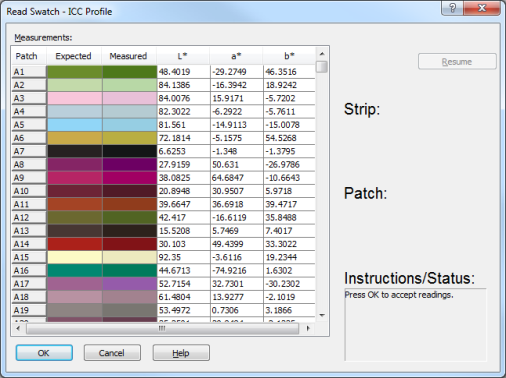
Measurements - The [Measurements] section displays the expected and measured readings with L*a*b* values of the measured data for each patch.
Mode - Some color sampling devices function in strip, or patch mode. This allows one to switch between the modes. This option is useful, if for example there are read errors while reading in strip mode. Simply click [Pause] button, switch the Mode to and click the [Redo Patch] button to re-read the problem patch.
Pause/Resume- This button allows the read process to temporarily be put on hold, making it possible to re-read patches, or strips that may have erroneous readings.
Redo Patch/Strip - When erroneous readings occur, this button allows one to re-read a patch, series of patches, or an entire strip.
Strip/Patch
This section indicates which passes are being read.
Instructions/Status - This section provides instruction for and status of swatch readings.
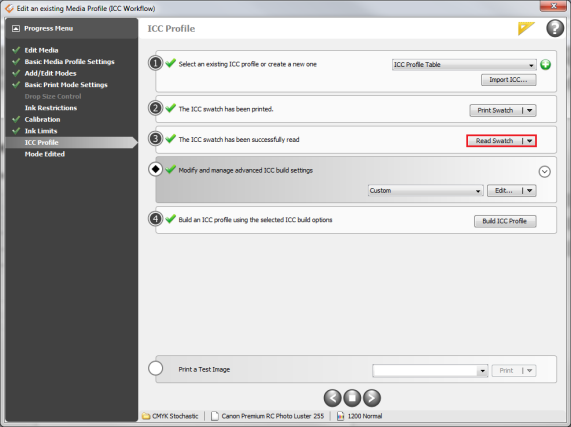
Import Readings (Figure 1) - This opens “Open” dialog. This option allows importing existing ICC measure data (.spec files).
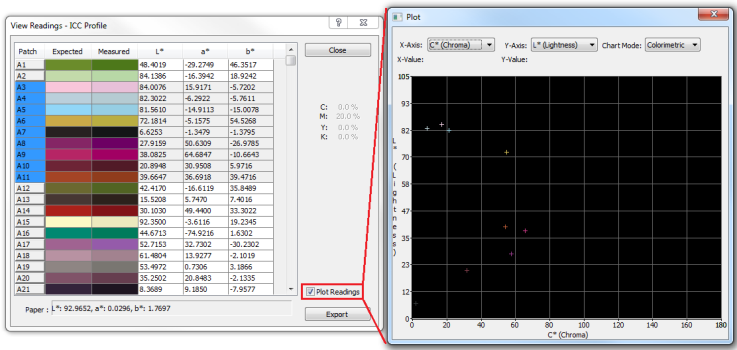
View Readings (Figure 1) - This opens “View Readings” dialog.
Channel Volume % - This option displays sample point of a highlighted patches approximate channel volume.
Plot Readings (Figure 3). - The "Plot Readings" dialog is an advanced tool for viewing various characteristics of single, or multiple patches (Shift + Click to highlight multiple readings).
Measurements can be plotted as Colorimetric data (L*a*b*, L*c*h*), or as Spectral data.
Export - [Export] allows measurement data to be saved as a ".spec" file.
 Swatch
 Read Swatch (Figure 2)